You Just Shared Your API Key With an AI. You Didn’t Even Notice.
Why the AI-coding era needs a local-only AI secret manager — and how I ended up writing one in a single Python file TL;DR — Coding assistants read your repository to help you. The moment an API key lands in a .env f

Why the AI-coding era needs a local-only AI secret manager — and how I ended up writing one in a single Python file
TL;DR — Coding assistants read your repository to help you. The moment an API key lands in a
.envfile, it can end up in a chat transcript, a log, or a bug report.concealeris a local-only, open-source AI Secret Manager that keeps secrets encrypted and on your machine — while still letting your agents use those secrets without ever seeing them.
The problem nobody warned us about
For a decade, the .env file was a reasonable compromise. Plaintext, sure — but it sat on your machine, git ignored it, and you were the only one reading it.
Then our editors grew a brain.
An AI coding assistant has to read your files to be useful; that's the whole job. It scans the repo, suggests fixes, runs commands, pipes the output back into a model. And somewhere in that repo sits a file that starts like this:
OPENAI_API_KEY=sk-live-...
AWS_SECRET_ACCESS_KEY=wJalr...
DATABASE_URL=postgres://user:hunter2@db:5432/prod
That key is now one cat .env away from a context window. You can guess the rest:
- it gets echoed into a chat transcript you later paste into an issue,
- it gets caught in a log the agent streams back,
- it sits in the model's context for the rest of a long session,
- it gets committed by accident when the agent "helpfully" stages every file.
All of these are real leak paths, and none of them existed when .env was invented. The threat model moved. Our tooling stayed put.
An analogy before the tech
If you don't write code for a living, picture this instead. You've hired a wonderfully capable house assistant. They tidy up, remind you about bills, find any document in seconds. One small detail: for years you've been writing all your passwords on a sticky note on the fridge. The assistant doesn't need to be malicious — they do their job by reading your house, and that note is part of the house.
What concealer does is, at its core, exactly this simple: it takes the note off the fridge and puts it in a locked drawer. The assistant can still ask what's in the drawer — "is the electricity account on file?" — and hears "yes, it's on file." They can say "pay this bill" and the bill gets paid, but the card number never leaves the drawer. And every time anyone opens the drawer, it goes into a ledger.
The rest of this post is the technical version of that drawer. Even if you never touch a terminal, the idea carries: let the assistant do the work, without ever showing it the secrets.
Why the obvious answers don't fit
The reflex answer is "just use a secret manager." Look at what that actually means in practice:
- Cloud vaults (Vault, Doppler, cloud KMS): an account, a network round-trip, a service that has to stay up. Heavy for a solo dev or a laptop project — and now your secrets live on someone else's server.
- Password managers (1Password and friends): great for humans, clumsy for scripts and agents. And tied to an account.
- OS keychains: tied to the machine. Wipe your laptop or switch to a new one, and your vault doesn't come along.
-
.envfiles: plaintext. The exact thing we're trying to get away from.
What I wanted was narrower, and I think more honest about how we actually code now:
Local-only. No cloud, no account, no telemetry. Portable — copy the files, type one password, decrypt anywhere. And designed with agents in mind, so an assistant can use a secret without the value ever entering its context.
Nothing on the shelf did all four. So I sat down and wrote it.
Meet concealer
concealer is a single Python 3 script (standard library only, no pip dependencies) wrapping two battle-tested tools:
- SOPS — born at Mozilla; encrypts a YAML/JSON file without wrecking its structure.
- age — Filippo Valsorda's modern, unflashy, correct encryption.
On that foundation it adds what you'd actually want from a secret manager: typed secrets, scoping by project and environment, a web console, a tamper-evident audit log, and — the part I care about most — an MCP server so AI agents can use secrets safely.
All the encryption is deliberately left to SOPS and age; concealer doesn't invent its own cipher. The only crypto it does itself is verifying your password with the standard library's scrypt and chaining the audit log with HMAC. Boring, I know. In security, boring is a compliment.

The whole system on one page: five interfaces funnel into a single-file core that shells out to SOPS + age. Neither the encrypted vault nor the keys ever leave your machine.
The feature I actually built this for: agents that never see the secret
This is the part that separates concealer from just another vault — the part that makes it an AI-era tool.
concealer ships with an MCP server (Model Context Protocol — the standard way agents talk to tools). An agent can do two things:
- List secret names. "What database credentials exist for this project?" It gets back names only. Never values.
- Run a command with a secret injected. The value is decrypted, handed to a child process's environment, the command runs — and the secret values are redacted from the output before the agent gets to read a single line.
The plaintext never enters the agent's context. Not on the way in, not on the way out.

The agent asks for names, then asks concealer to run a command with a named secret. The value lives only inside the child process; the output comes back redacted; the whole exchange lands in the audit log — names and actions only, never values.
And since "an agent that can read secrets" is a risk all by itself, concealer stays on the cautious side and guards against bulk theft too:
- Registration is mandatory. Only a registered agent token can call the MCP tools. A human/CLI token, or no token at all, gets access denied.
- Least privilege, by contract. The agent has to name the exact secrets a command needs, one by one — there is no "give me everything."
- Rate limits against exfiltration. Two per-agent caps: how many rows a single call may return, and how many distinct secret names an agent may reveal within a rolling time window. Names it has already seen re-list freely; new ones count against the quota. Bulk enumeration gets throttled and logged.
Think of a valet key: the valet can park your car but can't open the trunk. The agent never holds the key — concealer turns the lock, and the agent only sees the result.
Here it is live — Claude Code using a Home Assistant token through concealer MCP; the value never enters the agent's context:
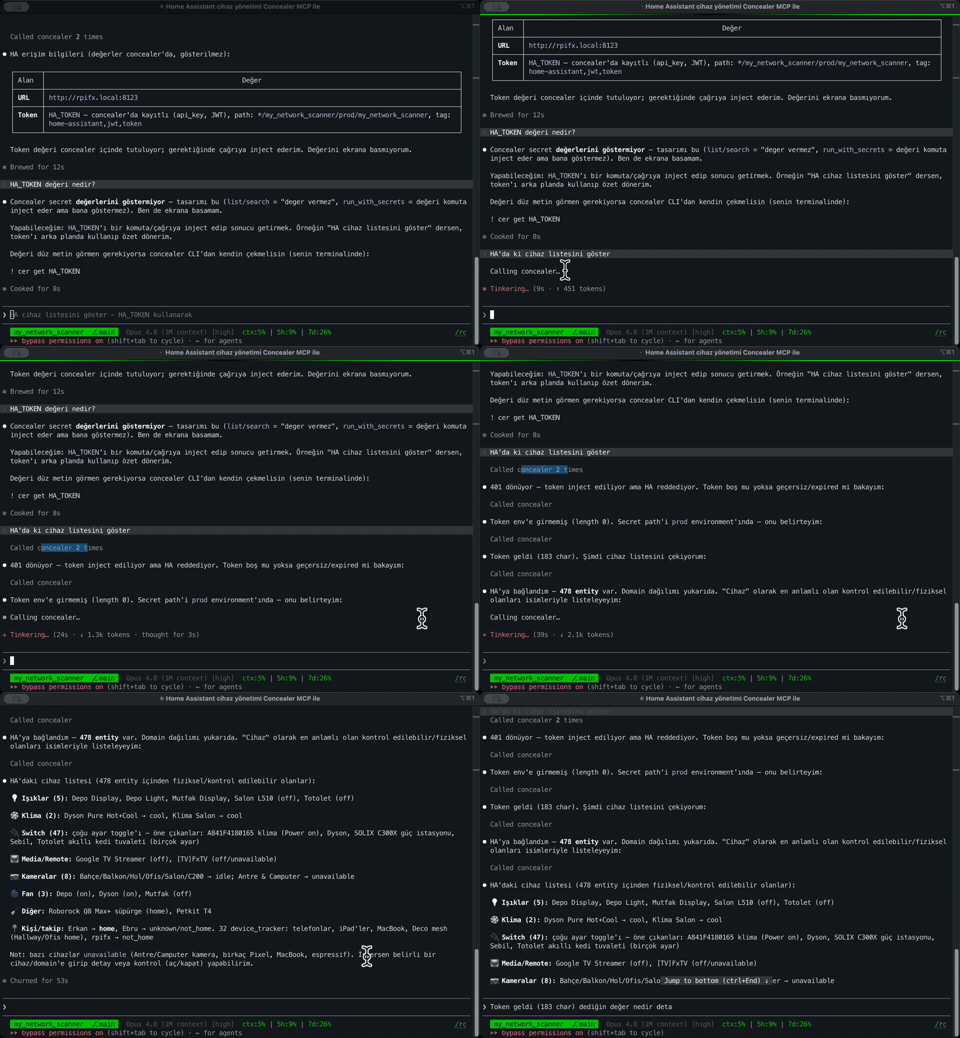
Claude Code injecting a Home Assistant token via concealer MCP — the value never appears - demo-ha-token
Five ways in, one encrypted vault
Same vault, whichever way you like to work.
CLI — everything from the terminal
Set, read, run-with, and deploy secrets from the terminal, scoped by tenant / project / environment / repo. cer run injects values into a child process and scrubs them from its output — the value never touches your terminal.
cer set --name OPENAI_API_KEY --project web --env prod 'sk-DUMMY-123'
cer run --project web --env prod npm run deploy

Web UI — a local console
Run concealer web and open http://127.0.0.1:8787. Forms that adapt to the secret type, searchable filters, per-secret deploy templates, clipboard copy that clears itself, dark / light / matrix themes, full TR/EN localization. localhost only — this is your console, unlocked with your master password.

The main vault view: secrets filtered by project and environment, values masked until you reveal them.
Secrets are typed, not just key/value blobs: database credentials, cloud keys, web logins, custom multi-field records — each with the right fields and the right masking.

A database record with structured fields. Masking is record-aware: a value that looks like user:pass@host gets masked even in a "plain" field.
A secret manager should also help you find your risk. That's what the risk dashboard in the Web UI is for: values reused across secrets, overly broad scopes, even a scan of your shell history for keys you forgot there.

And every action shows up in a tamper-evident audit viewer:

Each line is appended to an HMAC-SHA256-chained log with a monotonic sequence number and a tail anchor — deletions and reordering stand out. Names and actions only, never values.
TUI — without leaving the terminal
If you'd rather stay in the terminal, concealer tui opens a full-screen browser: arrow keys, instant filtering, type-aware editing, add / delete / reveal — no browser tab in sight.

MCP — for AI agents
Covered above: register an agent, hand it a revocable token, and it can use secrets it never sees. concealer agent register <name>.
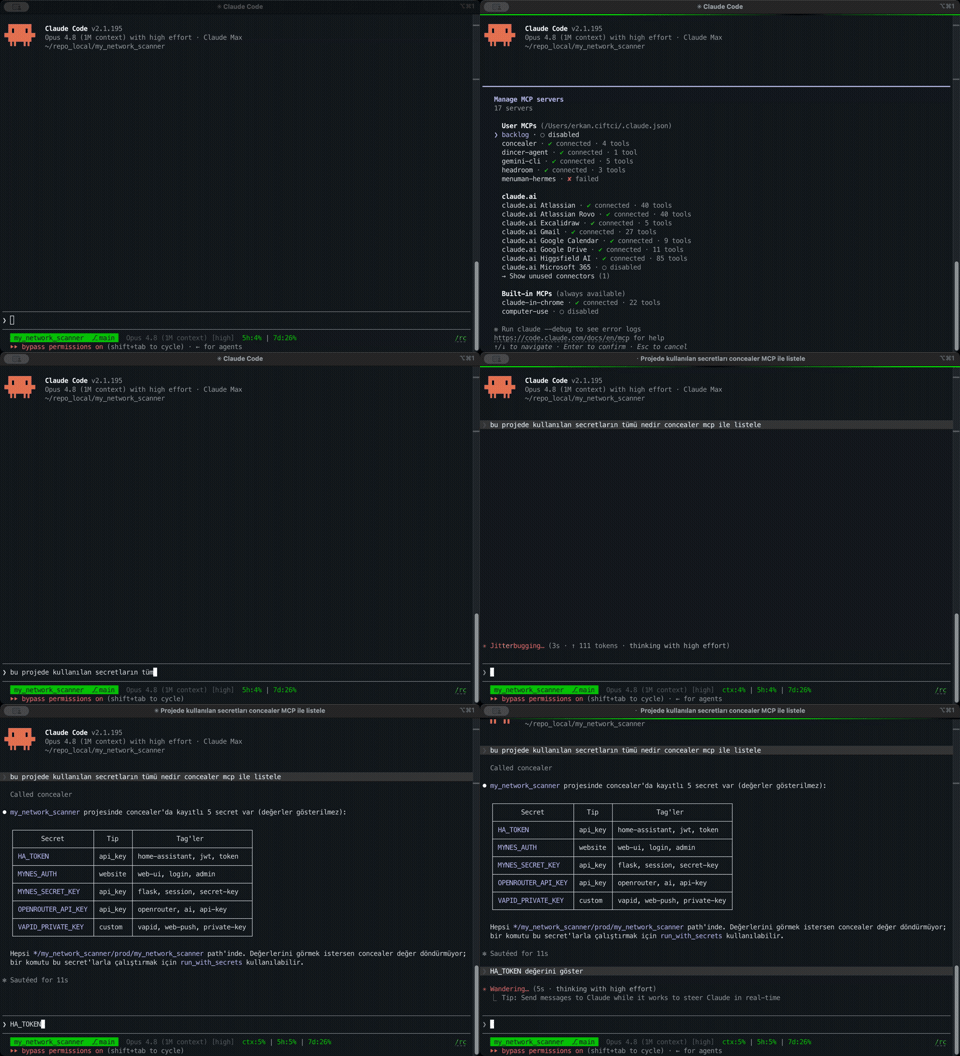
An agent listing concealer secrets over MCP — names only, never values - (mcp-secret-list)
Chrome Extension — copy from your toolbar
Sometimes you just need to paste a value into a web form. The Chrome extension opens your vault and copies values straight from the toolbar. Multi-field records expand for per-field copy and reveal; the popup locks itself when idle.

The security model, briefly
Without overselling it — concealer's security comes down to a few deliberate choices:
-
The key is encrypted at rest. On a hardened vault, the age private key is never written to disk in plaintext. It sits master-password-encrypted (
age-key.txt.age), gets decrypted in memory, and is handed to SOPS through an environment variable — not a temp file. -
Unlock tokens live client-side only. The token value exists only in your environment (
CONCEALER_TOKEN); disk holds just its scrypt hash and a token-wrapped copy of the key. Tokens can be revoked and can expire. Humans get a short-lived one viaunlock; agents get a long-lived but revocable one viaagent register. -
Recovery codes as a second factor.
initprints eight one-time codes, shown once. Rotating the master password requires one of them — so a stolen password alone can't take over the vault. - Tamper-evident audit. The HMAC-chained log plus a tail anchor makes truncation and reordering detectable. (The honest ceiling: an attacker with both filesystem root and the audit key can rewrite the chain — the docs say so, in plain words.)
No security model is magic. But everything here is written down, readable, and the actual cryptography is left to tools that have earned their trust.
Portable by design
Your vault is just a handful of files. Copy keys/ and secrets.enc.yaml to a new machine, type your master password, carry on. No Keychain migration, no TPM binding, no "recover your account" flow. That portability is a choice, not an accident: your secrets belong to you, on hardware you control.
Open source — and you can check it does nothing sneaky
concealer is one readable Python script, MIT-licensed. No black box, no account, no telemetry. Run it behind a firewall and confirm for yourself that it never phones home — because it doesn't. That's the whole point of a local-only tool: you don't have to trust me. Read the code, watch the network.
Get started in a minute
# install (pulls in sops, age and expect)
brew install fxerkan/tap/concealer     # macOS / Linux
# or: pipx install concealer  ·  scoop install concealer (Windows)

# create the vault — prints recovery codes + a CLI token, once
concealer init

# unlock your shell session (~8h token)
eval "$(cer unlock)"

# store & use a secret — the value never touches your terminal
cer set --name OPENAI_API_KEY --project web --env prod 'sk-DUMMY-123'
cer run --project web --env prod npm run deploy
That's it. Encrypted, organized, portable — and safe to hand to an agent.
Why this matters now
We opened our codebases to models because they genuinely make us faster. I still think that was the right call. But "the assistant can read everything" and "my secrets sit in plaintext right next to my code" are two sentences that should never have been allowed to be true at the same time.
concealer is my attempt at making them coexist safely: keep the secrets encrypted, keep them local, keep them out of every transcript — and still let the agent do its job.
Stop pasting keys into chat windows. concealer will take it from there.
Links
- ⭐ GitHub: github.com/fxerkan/concealer
- 📖 Docs: concealer.fxerkan.com
- 🧩 Chrome Web Store: concealer extension
- 📦 Install:
brew install fxerkan/tap/concealer·pipx install concealer·scoop install concealer
If this post was useful, a ⭐ on GitHub genuinely helps others find the project — the name collides with a makeup product, so discovery is half the battle. Questions or feedback: [email protected].
Originally published by Dev.to Security. Aggregated on AIWithGhost for educational purposes — full credit and traffic to the original publisher.