Windows 11 KB5132057 update released with 28 changes and fixes
Microsoft released the KB5132057 November Windows 11 preview update, which comes with 28 changes, including improvements to Windows Search, Windows Hello, and the Run dialog. [...]
Windows 11 KB5132057 update released with 28 changes and fixes
- November 20, 2026
- 04:25 AM
Microsoft released the KB5132057 November optional cumulative update for Windows 11 versions 25H2 and 26H2, which comes with 28 changes, including improvements to Windows Search, Windows Hello, and the Run dialog.
KB5132057 is a preview update that allows IT administrators to test Windows improvements, bug fixes, and new features before they become generally available in next month's Patch Tuesday release.
However, unlike regular Windows cumulative updates, monthly optional updates don't include security fixes and provide only quality improvements.

The KB5132057 update includes the new Windows Search Box experience that was built on WinUI 3 and removes promotional content from web results for better resource efficiency and a streamlined design.
After installing the November 2026 preview update, users will also get improved Windows Hello facial recognition that lets them sign into their accounts in dark rooms after enabling the "Automatically adjust screen brightness during face recognition" option under Settings > Accounts > Sign-in options > Facial recognition (Windows Hello).
KB5132057 also adds the new Run dialog, unveiled in May with a refreshed design and an almost instant time-to-show of just 94 ms. After installing the update, you can enable it by toggling on "New Run dialog" under Settings > System > Advanced.
You can install KB5132057 by opening Windows Settings, clicking on Windows Update, and then clicking 'Check for Updates.'
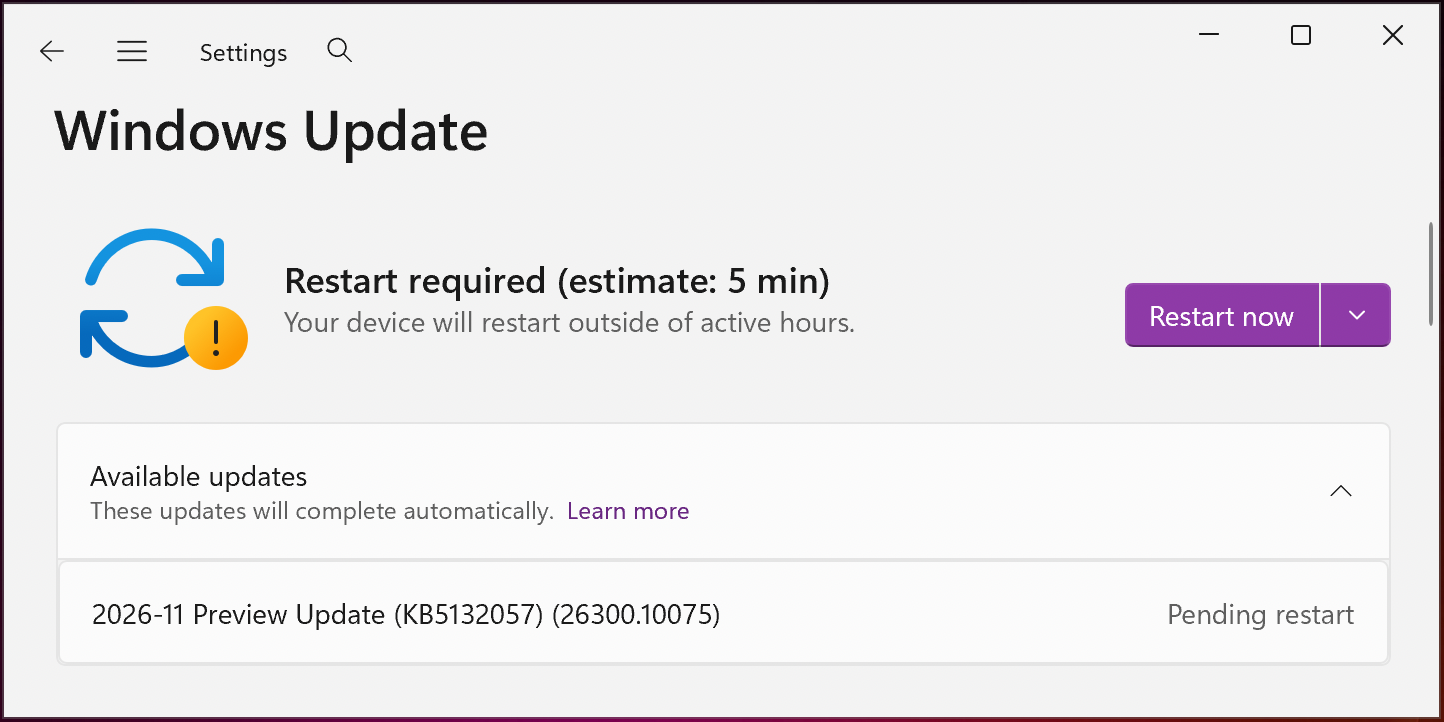
Since KB5132057 is an optional update, click the "Download and install" link if you don't already have the "Get the latest updates as soon as they're available" option enabled, which would prompt the OS to install it automatically.
You can also manually download and install this preview update from the Microsoft Update Catalog.
Windows 11 KB5132057 highlights
Once installed, this optional non-security update will upgrade Windows 11 26H2 and 25H2 devices to builds 26300.10075 and 26200.10075, respectively.
The November 2026 preview update comes with many other changes, some of the most significant ones highlighted below:
- Search from This PC in File Explorer is now indexer-based, making it much faster and consistent with search from File Explorer Home.
- Inline actions: You can now complete common tasks directly from Windows Search without opening Settings. For example, you can turn on dark mode or Bluetooth, adjust screen brightness, mute your device, or arrange open windows. If you have an Android phone connected through Phone Link, you can also call or text contacts and use phone actions like “Find my phone” and “Do Not Disturb.”
- New! If you accidentally trigger the keyboard shortcut for Sticky Keys, Filter Keys, or Toggle Keys, you can now turn it off directly from the prompt that appears. You can still manage notifications and sounds for these features under Settings > Accessibility > Keyboard > Notification preferences.
- New! Web sign-in is now supported on Microsoft Entra hybrid-joined devices, in addition to Microsoft Entra-joined devices. At the lock screen, you can sign in without a password by using a FIDO2 security key, a passkey on your phone, or a Temporary Access Pass (TAP). After you sign in, Windows gets a Kerberos ticket, so access to on-premises file shares and internal sites continues to work. For more information, see Web sign-in for Windows.
- [File History] This update fixes an issue where the File History restore interface might not find backups when a drive is selected as the backup location.
On Thursday, Microsoft also warned customers that their devices may reboot one more time after deploying the November 2026 optional update and updates rolling out over the next months.
"With recent and upcoming Windows updates over the next few months, a limited number of consumer and business devices might experience one additional restart during installation," Microsoft noted in a message center update. "This one‑time restart occurs after a Secure Boot certificate update is applied as part of the Secure Boot update process."
Microsoft announced this will be the final non-security preview update released this year, as operations wind down for the Western holidays. Normal monthly servicing will resume in January.
Uncover email threats your existing defenses may miss.
Adaptive Security's AI agents analyze email intent, context, and behavior to uncover phishing, business email compromise, and invoice fraud.
See what's getting through with a 14-day read-only scan of Microsoft 365 or Google Workspace, with no MX changes.
Start your free email security scan.Originally published by BleepingComputer. Aggregated on AIWithGhost for educational purposes — full credit and traffic to the original publisher.