Still tracking company passwords in spreadsheets? You’re flying blind.
Tracking company passwords in spreadsheets can leave IT administrators unaware of weak, reused, or compromised credentials stored and shared outside approved systems. NordPass explains how centralized password management
Still tracking company passwords in spreadsheets? You’re flying blind.
NordPass Business
- November 20, 2026
- 10:00 AM
The password spreadsheet your admins use may look like a complete inventory, but it only reflects some of the credentials employees have reported using. More specifically, that spreadsheet doesn’t show passwords that have been changed, created, or shared since the document was last updated, until someone brings it up to date. That’s assuming someone ever does.
Meanwhile, work passwords can end up in all kinds of places. Someone saves one in their browser.
A teammate sends a shared login in chat to move forward with a project. Another employee decides to put a few passwords in a personal vault because getting access to the company one takes too long.
Unless someone reports these actions, the spreadsheet won’t capture them.
And so, admins may think they have a handle on company credentials when, in fact, their spreadsheet tells only part of the story.
The real reason credentials slip out of admins’ view
The predominant factor is convenience. When the approved process is slow or unclear, employees use what’s at hand: a browser’s built-in password storage, a shared Google document, a Slack message, or one of the sticky notes on their desk.
They may know that that’s against the rules, but in the moment, their priority is getting work done.
That’s why a process that relies on employees to manually report every new password, update, and shared credential is nearly impossible to sustain. If the official route feels like an obstacle rather than the easiest way to access work tools, people are more likely to work around it.
This preference for convenience shows up in people’s password habits, too. Verizon’s 2025 Data Breach Investigations Report found that, in the median case, only 49% of users’ passwords across different services were unique. In other words, more than half of those passwords were reused.
The “TOP 20 Not-So-Secret Business Passwords” report by NordPass has also found “123456” to be the world’s most common password used in a corporate setting. This shows that people generally take the easy route when it comes to passwords.
Without visibility, a company may not even know that one of its most important assets is protected by “123456” or another weak password.
To solve this problem, organizations need an approach that works for both employees and admins. Without one, credentials can remain scattered and difficult to manage, increasing the risk created by those blind spots.
The risks of poor visibility into company credentials
When admins can’t see where work credentials are stored, they also cannot know who uses them, who they’ve been shared with, or whether they’ve changed. They also cannot assess the strength and reuse of the passwords employees rely on every day.
Verizon’s report found that only 3% of compromised passwords in its dataset met basic complexity standards. That finding doesn’t describe every password in an organization, but it shows why teams need a way to identify weak credentials in the systems they manage.
Reuse matters, too: if a password is compromised, reusing it across services can put more than one account at risk.
This leads us to the most important element, which is that credentials still remain one of the main ways attackers gain unauthorized access to company systems and data. The 2026 edition of the Verizon Data Breach Investigations Report identified credential abuse as the initial access vector in 13% of breaches.
It also found that vulnerability exploitation accounted for 31% of breaches, underscoring the need for credential protection as part of a broader security strategy.
Keeping company credentials in a spreadsheet creates another risk. If ransomware attackers gain a foothold in the company network, they may search specifically for files containing passwords.
Ransomware groups such as Pysa have used automated scripts to scan drives for filenames and folders containing terms like “password,” “login,” “pwd,” and “passwd.”
If attackers find a spreadsheet, they may encrypt it and demand a ransom. They could also use the credentials inside to access other accounts and systems, potentially spreading the attack further.
The solution? A structured approach that’s easy for admins to manage and for employees to follow.
To keep company accounts protected, admins should be able to answer a few questions about each company password: Is it strong? Who owns it? Where is it stored? Who has access to it? Is it reused, old, or exposed in a breach?
Each factor matters because any one of them can create risk. A strong password could still be reused across multiple accounts, so if it’s exposed in a breach, attackers may be able to use it to access those other accounts, too.
A recent password change won’t tell you whether the right people still have access, either.
Reviewing factors like these helps admins understand what needs attention. But how can they keep track of all of it?
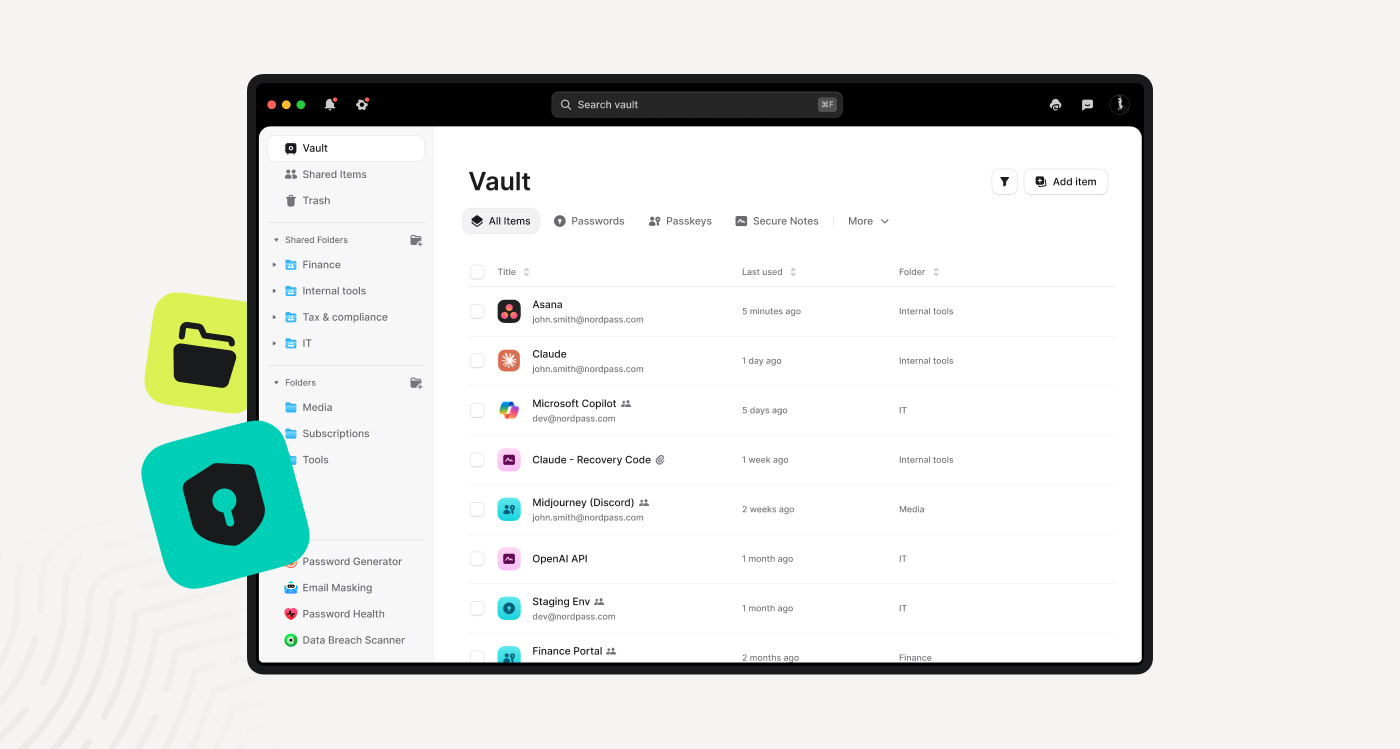
The right password manager can make this easier by giving your team one place to store and manage work credentials. NordPass, for example, offers organizations a centralized vault protected by XChaCha20 encryption and a zero-knowledge architecture, which means the service provider can’t access what’s stored inside.
NordPass also helps admins check the credentials in the vault. With features like the Data Breach Scanner and Password Health, it can quickly identify weak, reused, old, and exposed passwords.
With NordPass, admins can also set password requirements to make sure all credentials used by employees are strong, while users can share credentials securely over protected channels.
Beyond that, the Sharing Hub feature shows who has access to passwords shared with multiple people or teams, and the activity log records actions related to company passwords.
All of this gives admins a way to spot credential issues early, decide what to address first, and check what changed afterward to make sure company logins are as secure as they can be.
Get a clear view of your company passwords with NordPass
Make sure admins know where business credentials are stored, when they’re changed, and who can access them.
At the same time, give employees quick, easy access to the tools they need without encouraging workarounds.
Get started todayWhat a managed vault won’t solve on its own
A password manager can help solve the visibility problem, but it won’t address every aspect of it. Some employees may continue saving passwords in browsers or personal vaults, so adoption depends on making the approved option easy to use and setting clear expectations about how company logins should be handled.
Shared accounts may need clearer ownership, too. Your IT team should decide who is responsible for each login, who needs access, and when that access should be removed.
It’s also important to bear in mind that not every credential is a password. API keys, recovery codes, certificates, and other secrets may need their own storage, access, and ownership rules.
Therefore, a password health report shouldn’t be treated as a complete inventory of every way employees access company resources.
Stronger credential security starts beyond the spreadsheet
A password spreadsheet or any other manually updated document can’t provide a reliable view of your company credentials. But a secure business password manager like NordPass can.
It gives your team a secure place to store work credentials, shows you how healthy the passwords in the vault are, and makes it easier to set password requirements, share credentials securely, and track password-related activity.
So, if you really want to know what’s happening with your company credentials, give NordPass a try, and replace the spreadsheet with a business password manager built for the job.
Sponsored and written by NordPass Business.
Originally published by BleepingComputer. Aggregated on AIWithGhost for educational purposes — full credit and traffic to the original publisher.