How I Built a 10-in-1 Client-Side PDF Suite with Vanilla JS and $0 Server Cost
Whenever I needed to merge a few documents or compress a PDF, I kept running into the same two frustrations: Privacy: Why should I upload a bank statement, ID card, or private contract to someone else's server just to
Whenever I needed to merge a few documents or compress a PDF, I kept running into the same two frustrations:
- Privacy: Why should I upload a bank statement, ID card, or private contract to someone else's server just to rotate or merge two pages?
- Paywalls & Limits: Most popular online PDF tools lock you out after 2–3 tasks or slap a watermark on the output.
I started wondering: modern browsers are insanely capable—can I build a full multi-tool PDF suite that runs 100% locally in the user's browser with zero backend servers?
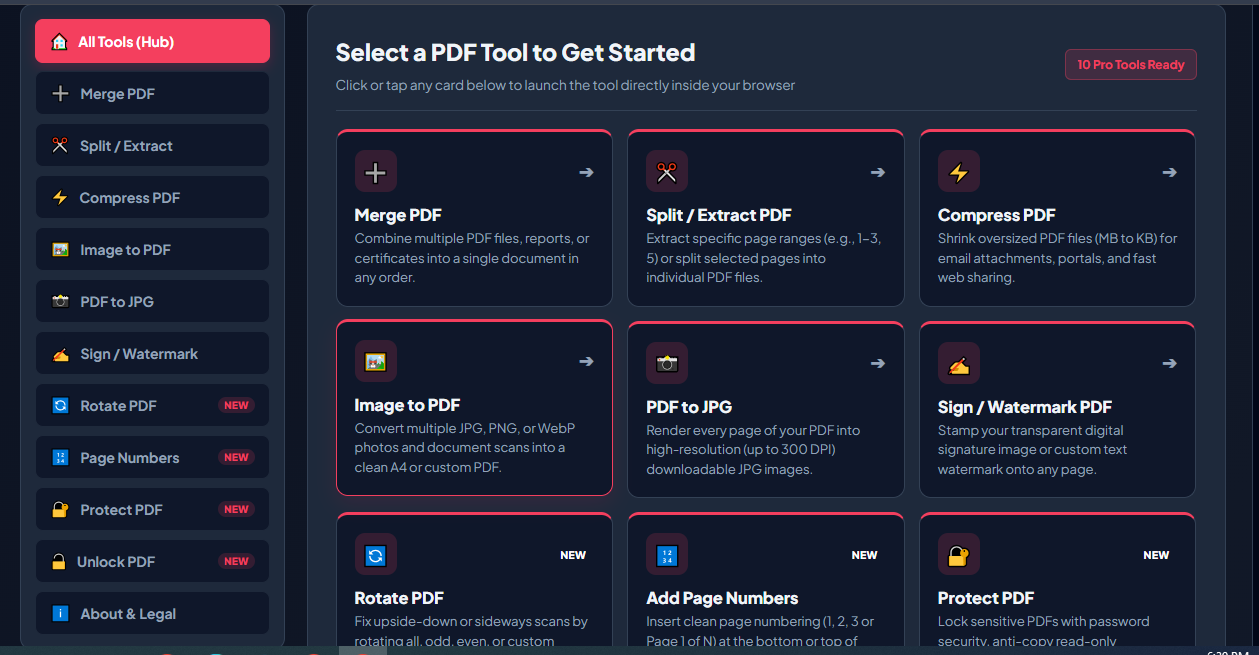
That question turned into SwiftPDF Studio Pro—a free, 10-in-1 client-side PDF toolkit that runs entirely on the user's device with $0/month in server costs.
Here is a quick breakdown of the architecture, how it works under the hood, and the challenges I ran into while building it.
The Zero-Backend Architecture
Instead of sending files to a Node.js or Python backend via multipart/form-data, every single operation happens inside the browser's local memory:
- Core Stack: Vanilla JavaScript (ES6), HTML5, and CSS3 (no heavy frontend frameworks to keep load times fast).
- PDF Manipulation: PDF-Lib handles merging, splitting, rotating, watermarking, page numbering, and editing PDFs directly in JavaScript.
-
Rendering & Conversion: PDF.js paired with
HTMLCanvasElementhandles PDF previews and PDF-to-Image conversion. -
UI & Preferences: Built-in Light/Dark mode persisted via
localStorage. - Hosting ($0 Cost): Since there is zero server-side processing, the entire app is statically hosted on Blogger/Blogspot. No VPS bills, no bandwidth spikes from large file uploads, and no worrying about auto-deleting user files from an S3 bucket—because no files ever leave the user's device.
How Local Processing Works Under the Hood
The beauty of client-side PDF processing is how clean the data flow becomes. For example, merging PDFs locally using PDF-Lib requires zero fetch() calls to a server—just reading files as ArrayBuffers and generating a downloadable Blob:
javascript
async function mergePDFsLocally(files) {
const mergedPdf = await PDFLib.PDFDocument.create();
for (const file of files) {
// Read file directly in browser memory—zero uploads
const arrayBuffer = await file.arrayBuffer();
const pdf = await PDFLib.PDFDocument.load(arrayBuffer);
const copiedPages = await mergedPdf.copyPages(pdf, pdf.getPageIndices());
copiedPages.forEach((page) => mergedPdf.addPage(page));
}
const mergedBytes = await mergedPdf.save();
const blob = new Blob([mergedBytes], { type: 'application/pdf' });
const downloadUrl = URL.createObjectURL(blob);
return downloadUrl;
}
Once the user closes the tab, everything in memory is gone. You can even turn off your Wi-Fi after loading the page, and the tools will still work.
**What's Included (10 Tools in One Place)**
Right now, the suite covers the everyday PDF tasks I actually needed:
**
- Merge & Split PDF
- Compress PDF
- Image to PDF & PDF to Image
- Sign PDF & Add Watermark
- Rotate Pages & Add Page Numbers
- Protect & Unlock PDF
**
**Challenges & Trade-offs I Ran Into**
Going 100% client-side isn't magic—there are real engineering trade-offs:
- Browser Memory Limits: Processing very large PDFs (100MB+) in browser RAM can slow down lower-end mobile devices. Managing `Blob` cleanup with `URL.revokeObjectURL()` and avoiding unnecessary canvas re-renders became essential.
- Client-Side Compression: Unlike server-side Ghostscript, true deep PDF compression in pure JavaScript is tricky. Balancing file size reduction with readable text quality using canvas/image re-encoding took a lot of trial and error.
- Making a Free Static Host Feel Like a Modern App: Stripping away default blog template bloat and keeping the UI responsive across mobile and desktop while maintaining clean SEO structure was a fun challenge in itself.
**Try It Out & Tear It Apart
**I actually just launched SwiftPDF Studio Pro on Product Hunt today as a solo side project, and I'd love honest feedback from fellow developers.
👉 Live App: [(https://swiftpdfstudiopro.blogspot.com/)]
If you have a minute to test it out, I'd love to hear your thoughts:
How does the speed feel on your device?
For devs who have worked with PDF-Lib or PDF.js—any tips for handling high-DPI PDF compression more efficiently on the client side?
What tool or UX improvement should I prioritize next?
Thanks for reading!
Originally published by Dev.to WebDev. Aggregated on AIWithGhost for educational purposes — full credit and traffic to the original publisher.