Email DNS settings: DKIM published is not the same as active
For years, my domain's email signing was misconfigured. One setting had never been switched on. Receivers check 3 DNS (Domain Name System) records to decide whether mail that claims to be from you really is: SPF (Send

For years, my domain's email signing was misconfigured. One setting had never been switched on.
Receivers check 3 DNS (Domain Name System) records to decide whether mail that claims to be from you really is:
- SPF (Sender Policy Framework): which servers may send mail for your domain.1
- DKIM (DomainKeys Identified Mail): a signature on your mail, made for a domain. Your mail provider signs with the private half of a key, and the public half sits in that domain's DNS.2
- DMARC (Domain-Based Message Authentication, Reporting, and Conformance): what receivers should do with mail that fails both checks for your domain, and where to send reports. Its policy has 3 levels: none, quarantine (treat as suspicious, usually by sending to spam3) and reject (refuse).4
My DMARC was at none, so mail that failed the checks could still be delivered. Now and then a bounce (a "could not deliver" notice) arrived for mail I never sent: someone was sending as my domain. I wanted to move DMARC to reject.
But reject is only safe when DKIM works. Forwarding usually breaks SPF but leaves DKIM intact,5 so mail relying on SPF alone fails DMARC when forwarded and can be refused at reject. The DMARC standard says it outright: a domain at reject must not rely on SPF alone.6
My DKIM key was published, exactly where it should be.
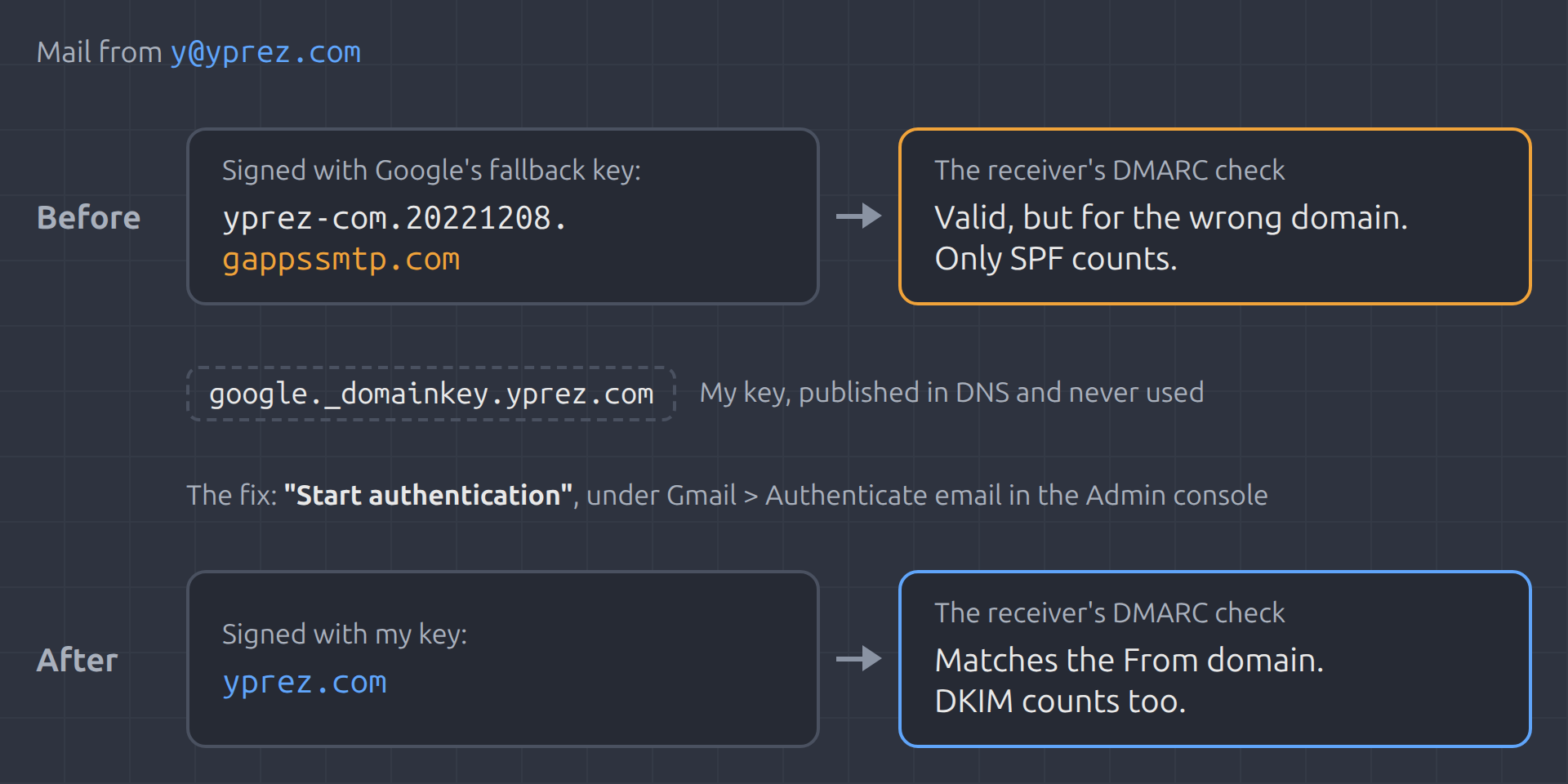
In the Google Workspace Admin console, under Gmail > Authenticate email, there's a button labelled "Start authentication", and I had never clicked it.7 Until you click it, Google keeps signing your mail with its own fallback key,8 on a domain like the one my mail carried: yprez-com.20221208.gappssmtp.com. Google's DKIM setup page doesn't mention the fallback.7 An older version of it did.8
The signature was valid, but for the wrong domain. By default, DMARC only credits a signature from your own domain or one of its subdomains.9 My mail was getting by on SPF alone.
The fix was to click "Start authentication". With DKIM signing as my domain, I could move DMARC to reject. The bounces for mail I never sent stopped.
How to check your domain
To check your domain, send a message from it to a personal Gmail account. Open it in Gmail on the web, choose "Show original"10 and read the DKIM line. If it doesn't say "PASS" with your domain, your DKIM isn't working.
A DKIM line that names a domain ending in gappssmtp.com means Google is signing with its fallback key, not yours.
I've been adding email DNS checks to Code Quality Check, the scanner we build. It checks SPF and DMARC configuration and flags weaknesses in email spoofing protection. Spotting the DKIM fallback takes a real message, since no DNS lookup can see which key actually signs.
What else would you check before setting DMARC to reject? If you want a second pair of eyes on your domain, send me a message.
Originally published by Dev.to Security. Aggregated on AIWithGhost for educational purposes — full credit and traffic to the original publisher.