Cleanup, not a rebuild - the fastest way to save on AWS
Do you know how much of your AWS bill goes to resources nobody on your team remembers anymore? I'll give you a moment to think... Done? After years of cost audits, I know one thing: usually more than anyone assumes. But

Do you know how much of your AWS bill goes to resources nobody on your team remembers anymore? I'll give you a moment to think... Done? After years of cost audits, I know one thing: usually more than anyone assumes. But to back it up with numbers: I often see 14%–22% of the monthly bill, and sometimes as much as 44%!
The biggest savings in AWS rarely require rebuilding the architecture. Usually a cleanup is enough: an EBS volume that hasn't been attached to anything for a year, snapshots of a machine that no longer exists, a NAT Gateway with no traffic flowing through it. I tell my clients this straight: it's like cleaning the Augean stables, not rewriting the system. For 5 years I've been building a tool that does that first review of an account, and its version 2.0 has just been released. It's my tool, so read this with a healthy dose of skepticism 😉
Where the money usually sits
The list from my audits repeats so often that I could recite it from memory. Besides what I mentioned above, it includes load balancers without a single working target, unassociated Elastic IP addresses, and RDS databases that nobody connects to or that are oversized. Rightsizing is a classic: EC2 instances, including those in Auto Scaling groups, running at a fraction of the capacity you pay for. A separate category is extended support charges: in RDS and in EKS clusters on an old Kubernetes version. And finally, Provisioned Concurrency in Lambda, configured and idle.
None of these items requires rewriting the system. To be clear: I'm not telling you to shorten the retention of production logs. I mean resources nobody will need in five years. One such cleanup, cleaning up EBS volumes, has its own write-up.
If it's that simple, why does nobody clean it up?
From my audits, I know two reasons:
- The team is afraid that the review will expose neglect, so the initiative dies before anyone looks into the account.
- In many people's heads, cost optimization means migration, so the fear of a "big rebuild" wins over the wish to save money.
Hence my Augean stables. Cleanup is boring, minimally invasive, and that's exactly why it works.
Of course, rewriting the system and changing the architecture have huge savings potential. However, it's a very big investment that carries risk, and in practice few people decide to rewrite a system unless they have their back against the wall, meaning the system costs more than it earns. Companies simply prefer to deliver new features rather than optimize and rewrite what already works.
So it's not that I ignore architecture topics. Quite the opposite. I've even given talks about it at several conferences, but day-to-day work shows me that few people make such a change. Realistically, few people even clean up their AWS accounts.
Why I started in the first place
In 2021 I was working with an AWS account that had access to cost information, but I couldn't give simple answers to the question of where that money was being wasted. Cost Explorer showed me the bill, and I needed a list of things to fix. Instead of clicking through service after service and console after console, I started writing my own application, and over the following years I kept adding patterns from client audits to it. And as always, the best list is the one you don't have to make by hand. I described the whole story in the article Why AWS Cost Explorer Isn't Enough, so here is just a summary. Today CloudPouch has more than 80 public releases behind it, the first one in November 2021, and emails are still answered by the same person. Yes, that's me.
CloudPouch 2.0 launch
I wrote a new version, CloudPouch 2.0, and it has a ton of new features. I'm very excited and I want to show them to you!
If you know CloudPouch from version 1.x, there is one key change: instead of running the analysis service by service, you run one scan of all supported services. And you can connect your AI agent to the results, more on that in a moment.
New Free plan
It's completely free, forever, and you get the full scan. Download the app from cloudpouch.dev and create an account.
Free is a fair price 😃
What one scan does in 2.0
One Savings Scan checks all supported AWS services in a single pass. While it runs, a progress panel shows which service the scan is on right now, and you can stop it at any time. The result opens with four cards: how much you can save monthly and yearly, how many items the scan found, and which type of finding (improvement opportunity) gives the most. Only below the cards will you find a diagram that shows where the money goes, and a table with all findings.
You choose the diagram layout from seven ready-made presets. The screenshot shows three stages: finding, resource type, and recommended action. I click one item to see what's behind it.
A claim is not evidence
Every finding has evidence. "This volume must be deleted" is a claim, and evidence is something else: the metrics, configuration, or reference data that CloudPouch based the recommendation on, plus the recommended action and the monthly savings where they can be estimated. An example? For an EKS cluster that fell into extended support, the evidence lists the Kubernetes version and the extra charge, and the action is an upgrade to a version covered by standard (free) support.
Let's take the finding from the screenshot below, an EBS volume type change. I do with it what I do in an audit: I check what CloudPouch reads from the AWS API (type, size, attached instance), what this volume actually did over 14 days according to CloudWatch metrics, and where the amount comes from, meaning the current cost, the cost after the change, and the estimated savings. Only with that evidence do I go to the team.

Why do I insist on this? Because in an audit, every recommendation goes to someone who knows the resource better than I do, and it has to defend itself to that person. A recommendation without evidence is an opinion.
Agentic FinOps: what your AI agent does
For me, the most interesting new feature in release 2.0 is Agentic FinOps, a modern approach that this version finally makes possible. CloudPouch's algorithms do the math, your AI agent works on the results (explains, prioritizes, turns them into next steps), and you get a verified solution: what to fix, why, and how much it's worth. Why this split? Because a model that guesses your AWS bill gives a confident answer, and confident does not mean correct.
The MCP server is built into the app, so Claude Code, Claude Desktop, Cursor, Codex, or Kiro can ask CloudPouch any question about AWS costs and savings. For example:
Which findings give the biggest savings, and what is the evidence for the first one?
For questions like this, the answer comes from your numbers, not from the model guessing. You'll find a ready-made configuration for each of these assistants in the app settings.
Findings in the app are sorted by estimated savings. The agent can do more, because it knows your context from the conversation. I asked Claude Code which three recommendations would give the biggest savings with the least work or risk. It queried CloudPouch seven times. The result is below.
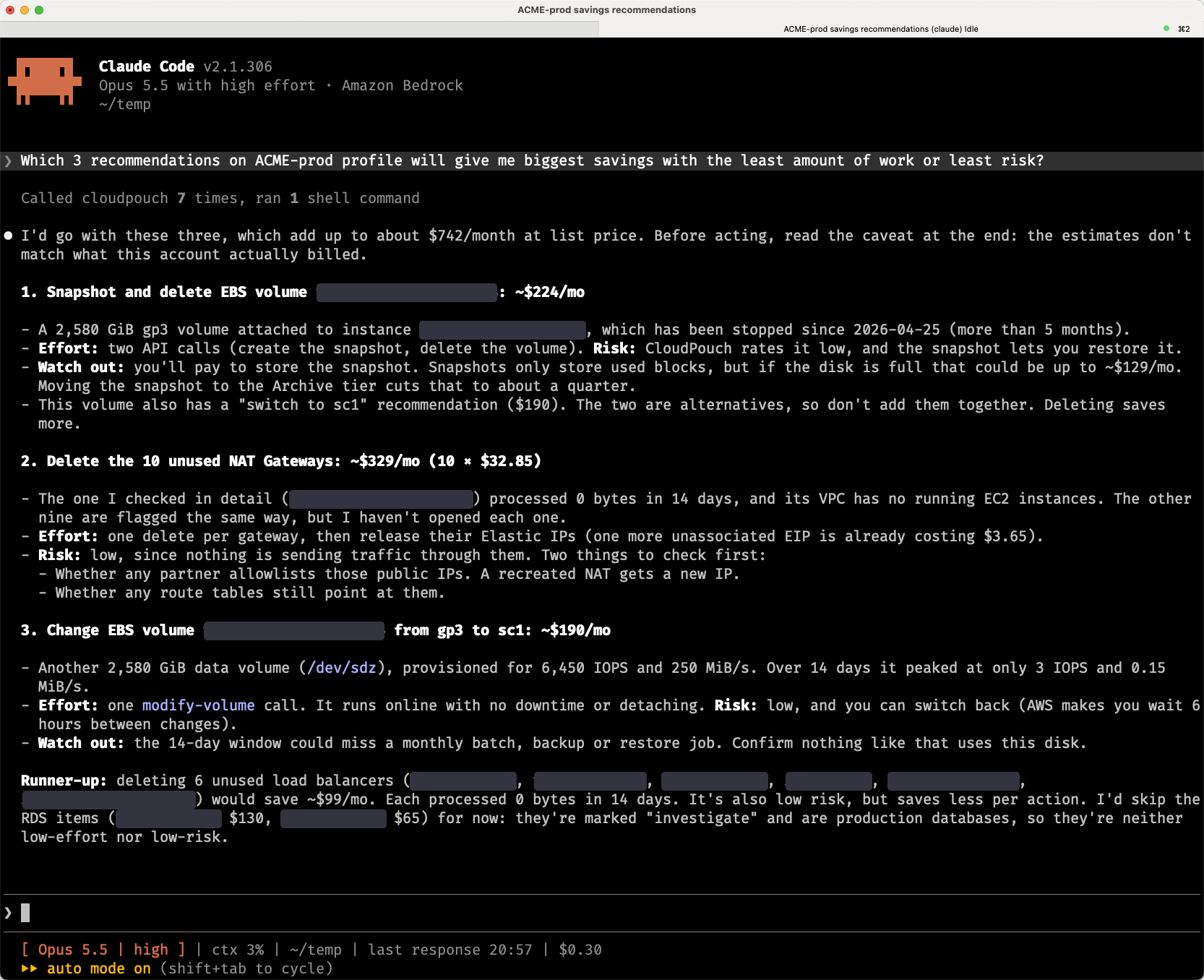
CloudPouch supplies the risk level and the metrics, for example a volume at 6,450 IOPS with a peak of 3 IOPS. The rest is the agent's work: it didn't double-count two alternatives for the same volume, it only inspected one of the ten NAT Gateways and says so openly, and it added partner allowlists and route tables to the pre-deletion checks. This is exactly the part of an audit I do sitting down with the team, after the list is generated.
In May I wrote about how much time it took me to connect AWS MCP Server to Codex through an AWS profile. Here the assistant doesn't get your credentials at all. It only asks CloudPouch, and CloudPouch uses the profiles you already have. This built-in server is disabled by default, runs only on your computer, and never modifies your AWS resources.
How to get started, step by step
The app runs on your computer, on the AWS profiles you already have: keys from AWS CLI and SSO, and since 2.0 also aws-vault and aws login. Cost data is never sent to CloudPouch servers, and you don't install anything into your AWS account. From audits I know that the slowest step is often just letting someone into the account. Here you don't have to let anyone in.
- Install the app: on macOS from the DMG file or with
brew install cloudpouch, on Windows from the EXE installer, on Linux from the AppImage. You need macOS 12 or newer, or Windows 10 or newer. - On the login screen, choose Pro trial: you enter your email, accept the terms, type in the 6-digit code from the email, and the license key appears in the app automatically.
- Choose an AWS profile. Cmd/Ctrl + K opens the profile search.
- Go to Savings (Cmd/Ctrl + S) and click Run Savings Scan.
- Open the Opportunities tab and click the top finding. You'll see the evidence and the recommended action.
- Enable the server in Settings (the MCP Server section), then in the AI assistants section choose your assistant and copy the ready-made configuration. For assistants that use a config file, the Open config file button opens the right file, and you paste the entry yourself.
- Ask the agent your first question, for example the one from the previous section.
How much does it cost
Pro trial gives you full Pro for 7 days, counted from registration, with no credit card, so you can check the list of findings with evidence and actions on your own account before you pay. After that, every scan you run is saved on your computer, separately for each profile, so after a cleanup you open the previous result and see whether the number really went down.
The price is fixed per license and doesn't grow with your AWS bill (unlike most FinOps apps), and one license covers any number of AWS accounts (again, competitors usually charge per account). Free costs nothing, Pro is $39 per month or $399 per year. Need Pro for the whole team? Team starts at $87 per month for 3 people. Details in the pricing on cloudpouch.dev.
Invitation
If you want to run the first review of your account, the same one I start an audit with, download CloudPouch 2.0 for macOS, Windows, or Linux: cloudpouch.dev
What was the weirdest thing you found in your AWS account that nobody remembered anymore? Let me know in the comments. I'm curious what the scan will find in yours.
Originally published by Dev.to AI. Aggregated on AIWithGhost for educational purposes — full credit and traffic to the original publisher.