Accessibility statements now have a home on GitHub
GitHub now highlights ACCESSIBILITY.md files and helps maintainers document accessibility goals, known barriers, supported environments, contributor expectations, and reporting processes. The post Accessibility statement
Accessibility work often lives in issue trackers, contribution guidelines, audit reports, team knowledge, and conversations with users. When that information has no predictable home, people who encounter a barrier must search for it, and maintainers lose context as contributors and project ownership change.
An ACCESSIBILITY.md file, now visible on repository overview pages, gives a project one durable place to explain its accessibility goals, contributor expectations, supported environments, known limitations, and process for reporting barriers.
GitHub makes accessibility statements easier to find
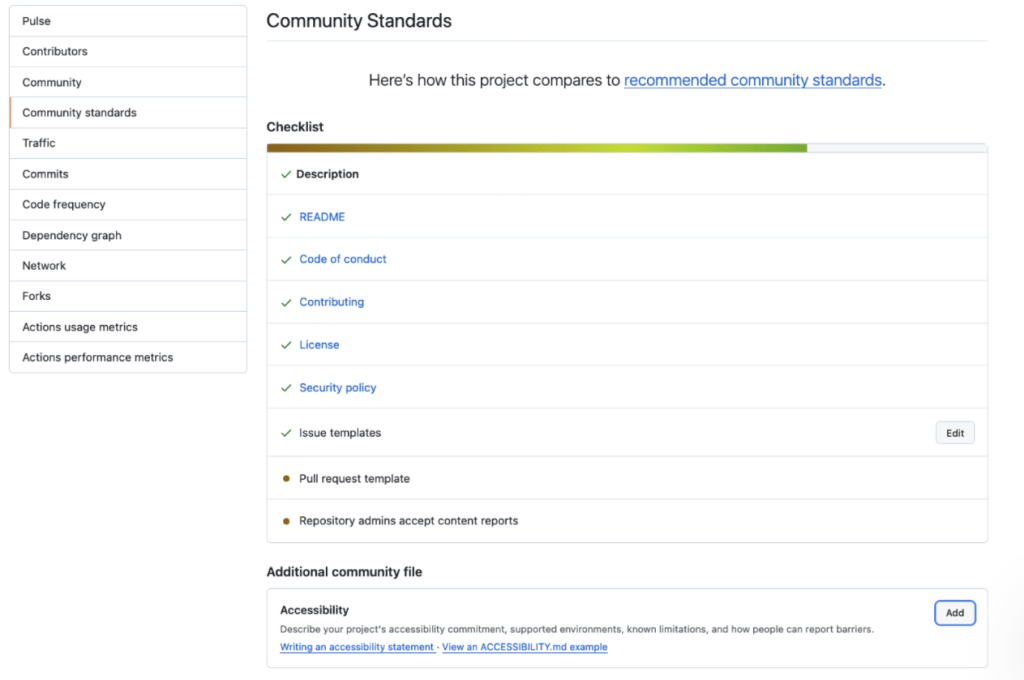
GitHub now recognizes the ACCESSIBILITY.md file in the repository’s root, .github/ directory, or docs/ directory. A repository can also inherit a statement from its organization’s .github/ repository. For public repositories, maintainers can add or propose a statement from Insights > Community Standards using a concise starter document.
GitHub’s community health files help people understand how a project works:
- Contribution guidelines explain how to propose changes
- Codes of conduct establish expectations for participation
- Security policies explain how to report vulnerabilities
Recognizing ACCESSIBILITY.md gives accessibility information a dedicated place alongside that guidance.
New repositories also include an accessibility issue label by default. The statement explains how to report a barrier and what to expect next, while the label helps maintainers organize and track the resulting work.
Accessibility statements make project practices visible
GitHub CLI’s accessibility statement, for example, documents settings, known barriers, and workarounds. It explains why table output can be difficult to follow with a screen reader and provides a command that prints pull request numbers and titles one per line instead. It also asks contributors changing prompts or output to show the results with relevant accessibility settings enabled. Developers using the CLI get a specific workaround; developers contributing to it get clear expectations for their changes.
The GitHub Annotation Toolkit’s accessibility statement documents a limitation of its Figma library: annotations use canvas position, connecting lines, and matching numbers to visually convey relationships. Access to individual canvas objects does not necessarily communicate what those relationships are.
The statement gives collaborators a concrete alternative: provide a structured text description that identifies each annotated element, its intended semantics and behavior, and any relevant ordering. For developers preparing or receiving a design handoff, this explains what information needs to accompany the visual annotations.
The file also explains how to report accessibility barriers and explicitly states that the library has not undergone keyboard-only or screen-reader testing. Readers get both practical guidance and clear limits on what the project has verified. Showing this information in the repository overview makes it easier to find alongside the project’s other documentation.
Document what the project can maintain
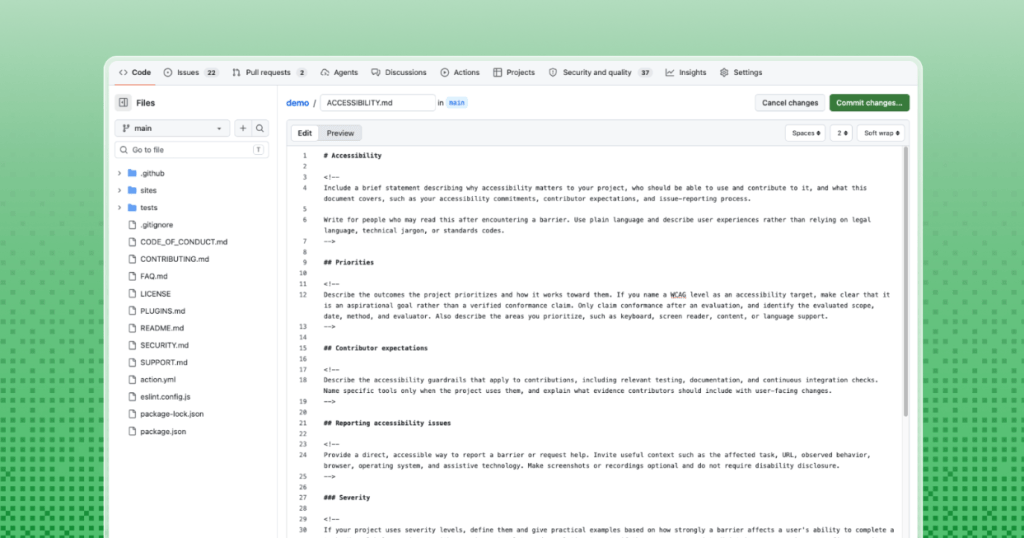
There is no one fixed format for an ACCESSIBILITY.md file. A small library, command-line tool, documentation site, and large web application have different users, risks, and maintenance capacity. Start with accurate information that the project can keep current.
- Priorities and goals: Explain why accessibility matters to the project and which user experiences receive attention.
- Contributor expectations: Describe the accessibility checks, evidence, or review practices expected for changes, including instructions for human contributors and coding agents.
- Reporting accessibility barriers: Provide a direct, accessible reporting path. Do not require disability disclosure, screenshots, or recordings.
- Response process: Explain how maintainers acknowledge, triage, track, and communicate about accessibility issues. If the project uses severity levels, let maintainers assign or confirm them during triage.
- Supported environments: List the platforms, browsers, input methods, and assistive technologies the project supports or has tested.
- Known limitations: Describe barriers in terms of the affected experience, include available workarounds, and link to tracked remediation work.
- Ownership and maintenance: Name the team, role, or maintainer responsible for keeping the statement and related practices current.
- Feedback and improvements: Explain how users and contributors can suggest changes to the statement or the project’s accessibility practices.
Keep in mind that a project can name a Web Content Accessibility Guidelines version and level as a target. A target does not establish verified conformance. A conformance claim requires an evaluation and should identify the evaluated scope, date, method, and evaluator.
What the most useful ACCESSIBILITY.md files contain
The most useful accessibility statements serve people who arrive after something has already gone wrong. Plain language, descriptive links, and a clear reporting route matter more than legal or standards-heavy language.
Useful reporting guidance invites relevant context, such as the affected task, page, observed behavior, browser, operating system, and assistive technology. It makes screenshots and recordings optional and avoids asking someone to prove a disability.
The statement should also set expectations that maintainers can consistently meet. That can include acknowledgement, status updates, available workarounds, expected timelines, and an opportunity for the reporter to verify a fix.
Start with an example and adapt it
The Open Source Accessibility Toolkit provides a detailed public example.
GitHub’s Community Standards workflow provides a shorter starter with prompts that projects can replace with their own information. The goal is not to produce a perfect policy before publishing the file. Start with accurate information, name the gaps, and update the statement as the project’s accessibility practices mature.
Adding an accessibility statement makes accessibility work more discoverable to users, contributors, and maintainers. Normalizing that practice across open source projects helps make accessibility part of how communities plan, build, report, and improve their work.
The post Accessibility statements now have a home on GitHub appeared first on The GitHub Blog.
Originally published by GitHub Blog. Aggregated on AIWithGhost for educational purposes — full credit and traffic to the original publisher.